
Adding a Semantic Layer to the Fediverse
In the last post, I explored what it looks like to treat a Mastodon feed as data instead of as a user interface.
The result was simple but useful: a script that pulls posts from the API, cleans the HTML, and prints readable text.
This post is a bit more in-depth than the previous ones.
The goal here is to take the next step and add a thin AI layer on top of that data.
A note before we get into it
In this iteration, we’re introducing prompts, API calls, and structured outputs. That adds a bit more complexity, but the overall approach remains the same: keep things simple, inspectable, and easy to reason about.
On model choice
Nothing in this setup is tied to a specific model or provider.
The pattern here is:
- take open, federated data
- send it to a model
- get back structured output
That part is interchangeable.
For this experiment, I’m using the OpenAI API (https://platform.openai.com/docs). The main reason is practical: I already have a business account set up, I’ve purchased credits, and I wanted to get a better feel for how the API behaves in a real workflow.
That said, this is not a statement about model preference or long-term direction.
In future iterations, I plan to explore:
- open-weight models via Hugging Face (https://huggingface.co)
- local models running on my own machine using tools like Ollama (https://ollama.com) or llama.cpp (https://github.com/ggerganov/llama.cpp)
If you’re following along, feel free to use whatever model or provider you’re most comfortable with. The rest of the system should work the same way.
The thin AI layer
The idea here is intentionally simple.
Instead of building a complex system, we add a single step:
- take cleaned post text
- send it to a model
- receive structured output
For now, that output is:
- a short summary
- a small set of topics
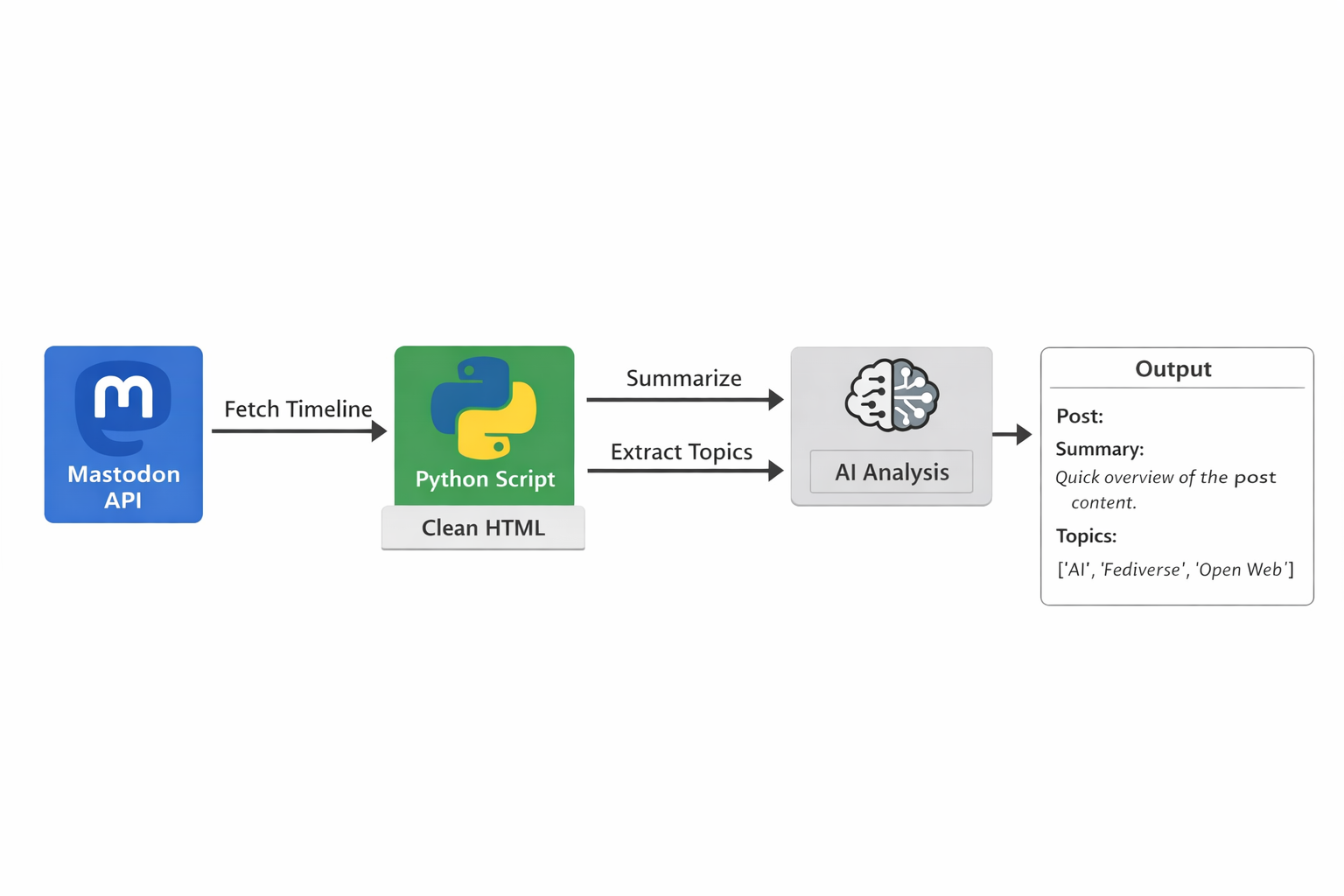
Conceptually, the flow looks like this:
- Mastodon API → raw data
- Python script → cleaned text
- AI layer → structured output
Prompting as the semantic layer
At this stage, the prompt is doing most of the work.
Rather than trying to infer structure in code, we define a small, constrained interface:
- summarize the post in 1–2 sentences
- extract 3–5 high-level topics
- return the result as JSON
A simplified version of the prompt looks like this:
Summarize the following Mastodon post in 1-2 sentences.
Then extract 3-5 specific, high-level topics.

Rules:
- Use short noun phrases for topics
- Avoid generic filler topics
- Avoid duplicates
- If the post is unclear, use fewer topics

Return output as JSON:
{
  "summary": "...",
  "topics": ["...", "..."]
}
The important part is not the wording itself, but the constraint. The output is predictable, structured, and easy to work with.
In that sense, the prompt starts to act as a lightweight semantic layer.
Using the OpenAI API
Under the hood, this layer is just a call to the OpenAI API.
For each post:
- the cleaned text is sent to the model
- the model returns structured output
- the result is printed alongside the original post
Here’s what that looks like in practice:
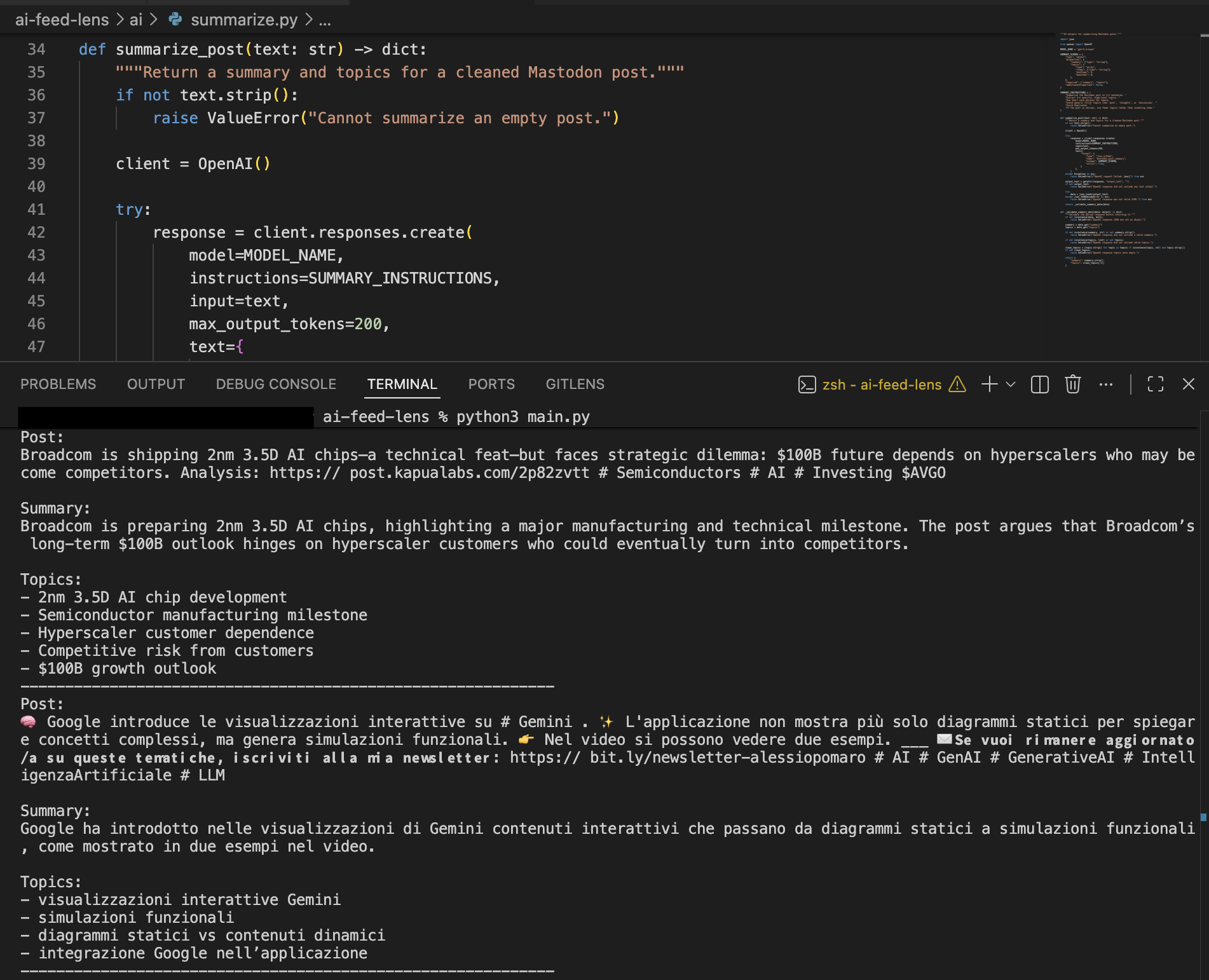
Output showing original post text alongside generated summary and topics.
What’s interesting here is not the sophistication of the model, but the transformation. Unstructured text becomes something that is easier to scan, compare, and reason about.
Getting an OpenAI API key
If you want to run this locally, you’ll need an OpenAI API key.
You can create one here:
https://platform.openai.com/api-keys
Then set it as an environment variable:
export OPENAI_API_KEY="your_api_key_here"
The script will pick it up automatically.
Billing and usage
You may need to add billing details to your OpenAI account before the API can be used.
The API is usage-based, meaning you are charged based on how much text you send to and receive from the model.
In this setup, each post results in a small request and a short response, which keeps usage relatively low.
Rough cost expectations
- processing ~50 posts will typically cost only a few cents
- processing a few hundred posts is likely well under a dollar
Actual costs depend on:
- model choice
- post length
- response size
Tips for keeping costs low
- limit the number of posts per run
- keep prompts concise
- use smaller models for extraction tasks
- disable the AI layer when not needed
Alternatives to OpenAI
This approach is not tied to OpenAI.
You can use:
Local models (Ollama, llama.cpp)
- no API cost
- full control
- works offline
Tradeoff: requires local hardware and may have lower quality.
Hugging Face models
- large ecosystem
- flexible deployment
- often cheaper
Tradeoff: more setup and variability.
Lower-cost APIs (Together, Groq)
- https://www.together.ai
- https://groq.com
These platforms provide access to open-weight models via API, often at lower cost.
The key point is that the architecture stays the same. The model is interchangeable.
What this changes
The system now has a new property.
Instead of just displaying posts, it starts to interpret them.
Even with a simple prompt, you get:
- compressed summaries
- consistent topic labels
- a more structured view of the feed
It’s still early, but this begins to move from raw data toward something closer to meaning.
What’s next
The next step is to push this further using the API as a semantic layer.
Instead of treating posts individually, the focus shifts to structure across them:
- grouping posts by shared topics
- generating summaries of an entire timeline
- identifying recurring entities and relationships
The goal is not just to annotate posts, but to see whether a coherent structure begins to emerge from a stream of federated data.
Closing
This is still a small experiment, but it changes the nature of the system.
The feed is no longer just something you read. It becomes something you can process, structure, and build on.
The interesting question now is how far this can go before the prompt itself starts to resemble a lightweight ontology.
Code: ai-feed-lens on Codeberg
semantic-layerTag:
post-03-semantic-layer